Case Study 05 · 2026
CareerScout — Job Match Scanner
Personal product — build a job profile, scan company career pages (Greenhouse, Lever, Ashby), and rank openings by fit.
Interactive prototype
Open live demo — try it in your browser
job-search-companion-plum.vercel.app
Project overview
What this project was
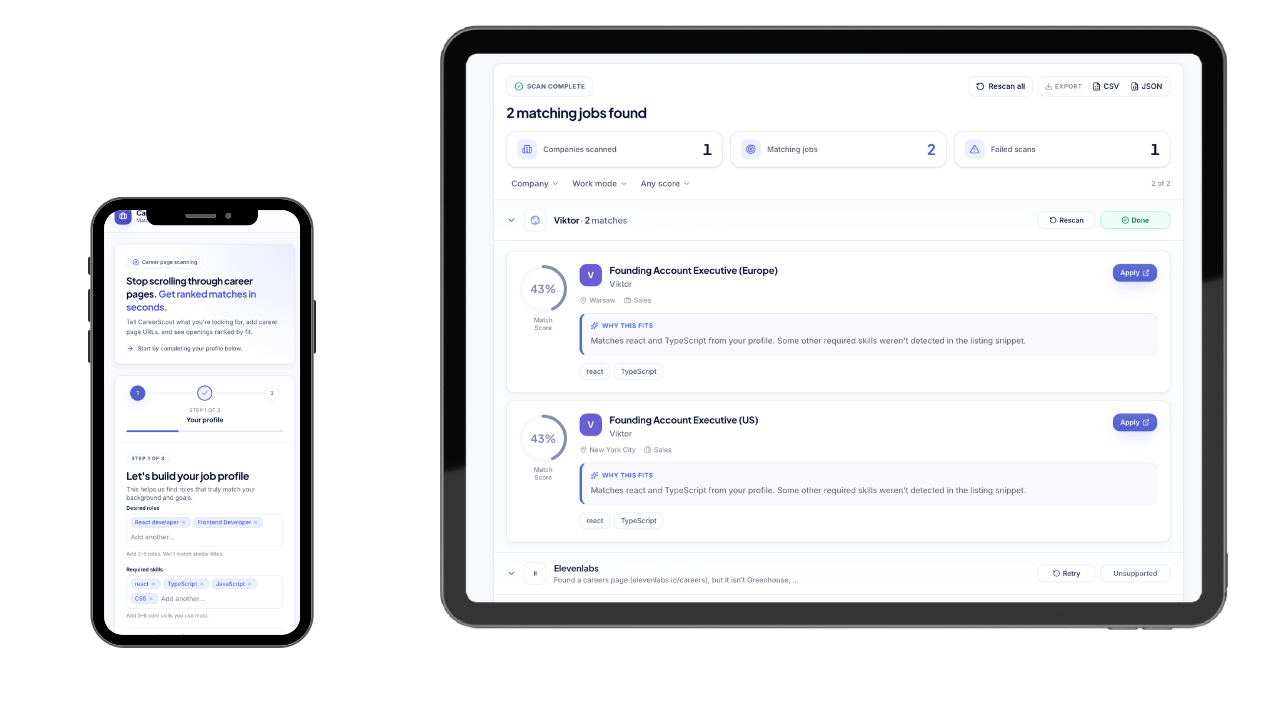
I designed and built CareerScout as a personal product for active job search. Users define desired roles and skills, paste company career URLs, and get openings ranked by fit. The app discovers supported ATS boards, explains unsupported pages clearly, and keeps profile and company lists available across sessions in the browser.
User goals
Help job seekers go from “which companies should I check?” to “which roles actually fit me?” — without manually comparing every listing to their CV.
Why it mattered
Career pages and ATS boards are fragmented. Fit is hard to judge at a glance. Unsupported or custom boards often fail without explanation — wasting time and trust. CareerScout turns that into a guided flow with ranked results and explicit scan status.
The problem
Where it was breaking
User pain points
- Checking many company career pages one by one is slow and repetitive.
- Hard to compare openings against your own skills without a shared scoring model.
- ATS boards differ (Greenhouse, Lever, Ashby, custom sites) — users do not know what will work.
- Failed scans often feel like “the tool is broken” when the board is simply unsupported.
Business challenges & constraints
- Keep onboarding short enough to start a scan, but rich enough for useful matching.
- Support real ATS boards while being honest about limits (custom careers pages, LinkedIn, Workday, etc.).
- Show progress and failures per company so users know what succeeded, what to retry, and what to replace with a board URL.
- Job extraction currently targets Greenhouse, Lever, and Ashby board URLs.
- Profile and company lists persist in the browser (localStorage) — no multi-user cloud account yet.
- Matching quality depends on the skills and roles the user provides up front.
My role
What I owned
Research & discovery
How I learned what mattered
- 01
Problem framing
Mapped the job-search loop: define fit criteria → collect company URLs → extract openings → decide what to apply to.
- 02
Flow design
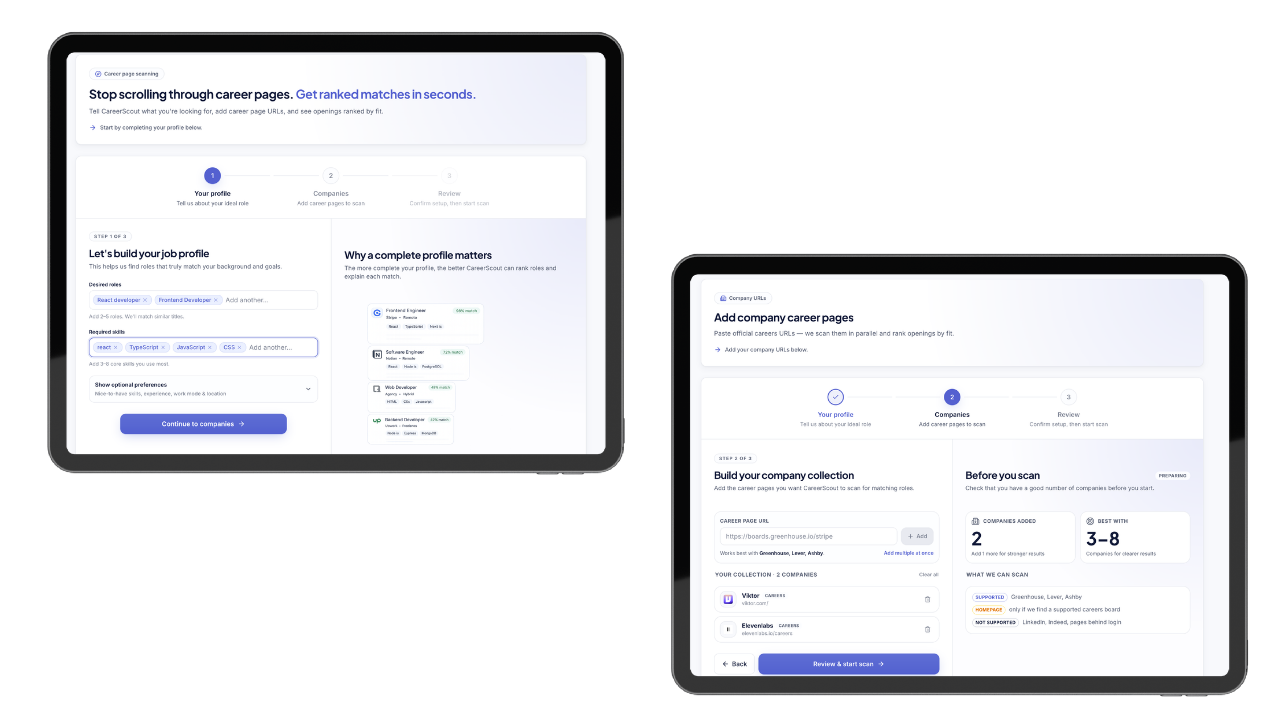
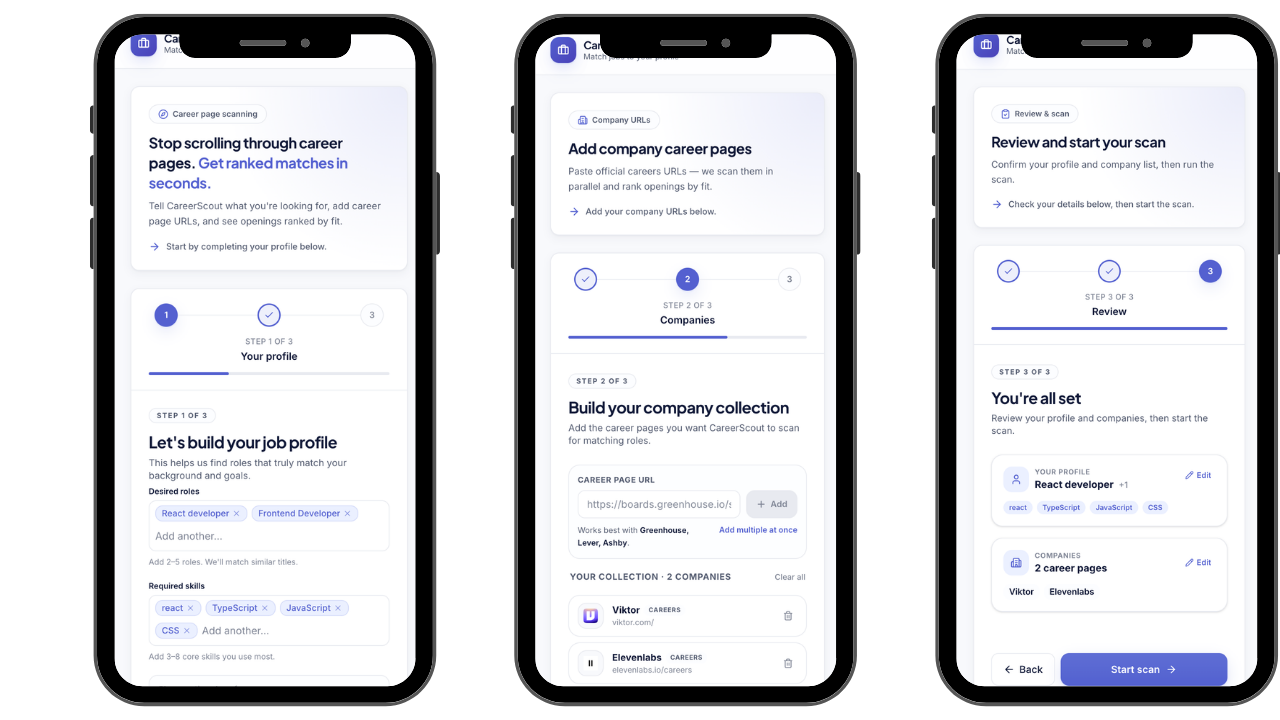
Structured a three-step onboarding (profile, companies, review) so scanning only starts when inputs are useful.
- 03
Board constraints
Classified career destinations and designed clear messaging for unsupported or custom careers pages.
- 04
Build & iterate
Shipped scan pipeline, match ranking, company-level status, filters, and results UI — refining copy for failed and unsupported boards.
Challenges
Technical & UX hurdles
Career URL discovery & classification
Homepages and careers links often redirect to mixed destinations. The app must prefer supported ATS boards and avoid misleading failures (e.g. incidental LinkedIn profile links).
Honest unsupported states
Custom careers pages and unsupported ATS need plain-language status (e.g. Unsupported) plus guidance to paste a Greenhouse, Lever, or Ashby URL when available.
Match results that stay scannable
Many openings across companies require ranking by fit, filters, and grouping by company — without turning results into a dense dashboard.
The solution
What I designed & shipped
Guided three-step setup
Profile (roles & skills), companies (career URLs), then review & start scan — so matching has enough signal before work begins.
Supported ATS scanning
Extract jobs from Greenhouse, Lever, and Ashby boards, with discovery when users paste a company homepage or careers page.
Fit-ranked results
Openings scored against the user profile, filterable and grouped by company, with rescan/retry per failed board.
Clear failure communication
Per-company status and error copy explain unsupported boards instead of failing silently.
Results & impact
What this product aims to improve
A focused job-search companion: one profile, multiple company boards, ranked matches, and honest feedback when a careers page cannot be scanned — instead of silent failure or generic empty states.
Key learnings
What I'm taking forward
Lesson 01
For tools that hit third-party sites, trust comes from clear limits — users forgive unsupported boards when the next step is obvious.
Lesson 02
Onboarding length is a product decision: too little profile data weakens matching; too much delays the first useful scan.
Lesson 03
Status language matters — “Unavailable” feels like an outage; “Unsupported” correctly frames a product constraint.
Lesson 04
Building end-to-end (UX + frontend + scan pipeline) surfaces edge cases early — discovery, classification, and results UI have to tell one story.