Case Study 03 · 2024
Crowdfunding Dashboard
Frontend development for the JustGiving Crowdfunding dashboard — live donation progress, milestone tasks, and guided next steps, built from UX designs.
Project overview
What this project was
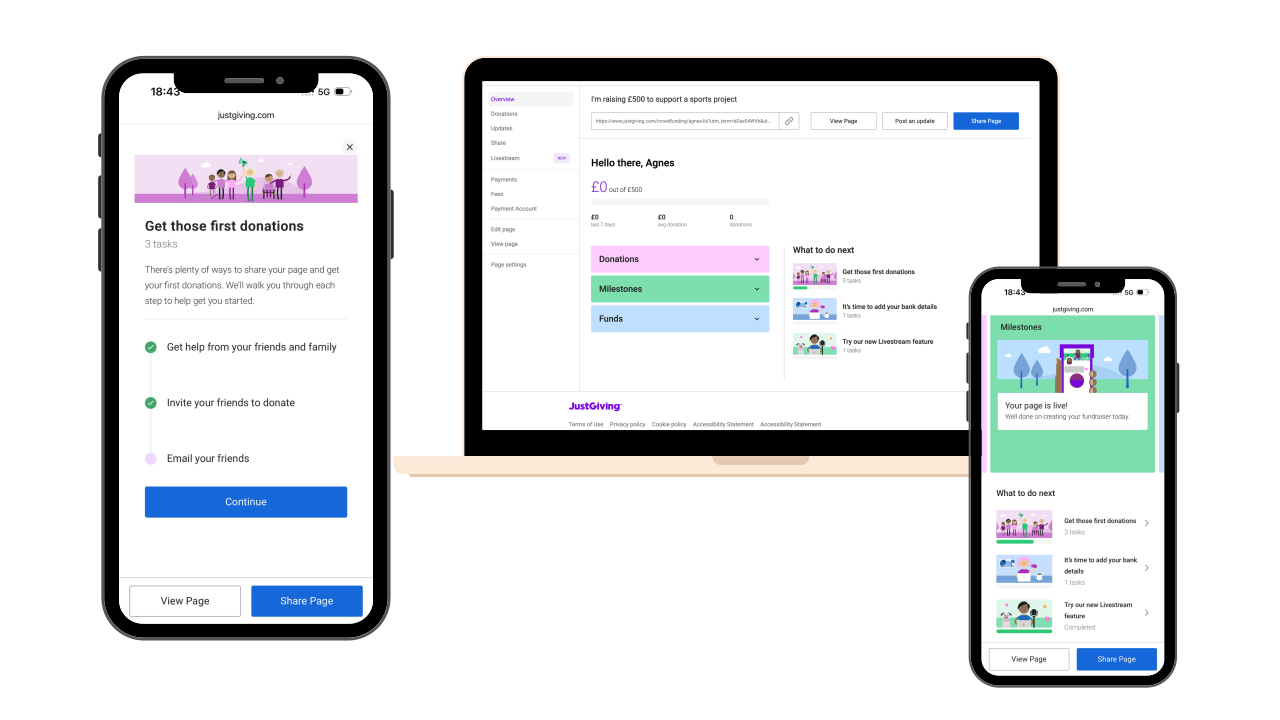
I was responsible for frontend development on the redesigned Crowdfunding Dashboard at JustGiving. Working from UX designs, I built the shipped UI — live progress toward the goal, milestones, checkable tasks, and integration status — so fundraisers have one clear home base after their page goes live.
Business goal
Give first-time and returning fundraisers one clear place to understand performance, know what to do next, and finish required setup — without leaving the crowdfunding experience.
Why it mattered
Crowdfunding pages only work when fundraisers keep momentum after launch. The basic dashboard did not guide next steps or surface progress clearly — users could miss critical setup (like bank details in time) or never discover tools that help them raise more. The redesigned experience turns passive monitoring into an active, guided campaign.
The problem
Where it was breaking
User pain points
- The basic dashboard gave little guidance after publish and limited visibility into campaign performance.
- No single view showed crowdfunding goal, amount raised, and donation progress together.
- Users did not know which actions to take next — share the page, complete setup, try new features.
- Important tasks (e.g. bank details) were easy to miss, with real consequences if left too long.
Business challenges & constraints
- Explain crowdfunding tasks to a wide audience — from first-time fundraisers to experienced campaigners.
- Surface time-sensitive requirements (e.g. bank details within 30 days of the first donation) without creating panic.
- Introduce new platform features (like Twitch/YouTube livestreaming) in the same task model as core setup steps.
- Replaced a basic existing dashboard — the redesign had to feel like a clear step up, not a separate product.
- Progress bar and totals had to update live as donations arrived.
- Tasks, milestones, and third-party integrations (Twitch/YouTube) needed consistent completion states on one screen.
My role
What I owned
Research & discovery
How I learned what mattered
- 01
Design handoff
Reviewed UX designs and product specs for the redesigned dashboard — progress bar, milestones, tasks, and post-publish flows.
- 02
Frontend planning
Broke the UI into components and aligned with backend on live donation data, task states, and third-party integration status.
- 03
Build
Implemented the dashboard frontend — dynamic progress, checkable tasks, milestones, and completion states across setup and promotion flows.
- 04
Ship
Delivered share, bank details, and Twitch/YouTube livestream flows in production, with status updating to Completed on the dashboard.
Challenges
Technical & UX hurdles
Live donation progress
The crowdfunding goal, amount raised, and progress bar needed to update in real time as donations came in — so users always saw an accurate picture of their campaign.
Milestones & ordered tasks
The dashboard had to show what users could do step by step, with clear done / not-done states — without feeling like a long checklist.
Time-sensitive setup tasks
Bank details had a real deadline (within 30 days of the first donation, or the page pauses). The UI had to explain why it matters and make the task easy to find.
Feature adoption in context
New tools like Twitch/YouTube livestreaming had to appear as normal dashboard tasks — connect an account, complete setup, see status update to Completed on the same page.
The solution
What I built
Live progress bar & goal
Built the crowdfunding target, amount raised, and progress bar UI — updating in real time as donations arrive.
Milestones & step-by-step tasks
Implemented milestone and task components with clear done / not-done states as users complete each step.
Share your page
Built the share task flow — e.g. promote the crowdfunding page on Facebook or Twitter — as a checkable dashboard action.
Bank details with context
Implemented the bank details task UI — including deadline context and the 30-day window after the first donation.
Twitch/YouTube livestream integration
Built the livestream setup task and integration status — showing Completed on the dashboard once Twitch/YouTube is connected.
Screens
The redesigned flow, end to end
In action
Crowdfunding Dashboard — feature walkthrough
A short walkthrough of the feature as shipped — the same flow described in this case study.
Results & impact
What changed after launch
JustGiving Crowdfunding replaced a basic dashboard with a fuller experience — live progress, milestones, and checkable tasks. I implemented the frontend from UX designs. After launch, page sharing on social media and email rose by 40%, and task completion by 30%.
+40%
Sharing the crowdfunding page on social media & email — dashboard tasks encouraged more users to promote their campaign
01+30%
Users completing dashboard tasks — checkable steps to share your page, add bank details, connect livestream & more
0230
Days to add bank details after the first donation — or the crowdfunding page is paused
03Key learnings
What I'm taking forward
Lesson 01
Live donation data needs reliable UI states — loading, updating, and stale data must all feel intentional.
Lesson 02
Task completion patterns are easier to maintain when done / not-done is one reusable component model.
Lesson 03
Time-sensitive tasks need visible status in the UI, not just copy in a modal.
Lesson 04
A consistent task component scaled well when livestreaming was added alongside core setup flows.